
Always record what happened, any time something goes wrong
If something goes wrong between you and another PCEO member in the lobby, even if it is your fault, Record it so that you have video evidence. Reporting a problem, and apologizing for any problems or misunderstandings helps smooth things over. Be friendly and polite and give your fellow member the benefit of the doubt that it was not on purpose.
Here’s how to record what just happened:
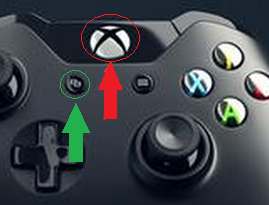
- Press the “Home” button on your controller (red arrow in picture below)
- Press the “View” button, for Capture Options (green arrow in picture)
- Select:
Capture what happened
From 15 sec to 5 min - Pick how long to capture. You can record up to the last 5 minutes, or shorter if it happened a few seconds ago.
- Wait for your video clip to upload to xbox live. This can take several minutes depending on your connection.
- You can find your video clip online by visiting the following web site and entering just your gamertag: http://www.xboxdvr.com
- On that site you’ll see your videos. You can open the video to confirm it’s what you want then copy/share the link to Discord.
Note: If the xboxdvr site does not show your videos, then your privacy settings are set incorrectly for sharing video. There’s a simple video tutorial on the xboxdvr site to help you correct the settings so you can share videos.